Voice: (800) 827-6364
America Online v3.0 for Windows:
DIP Switches: 3, 5, 8 DOWN (ON)
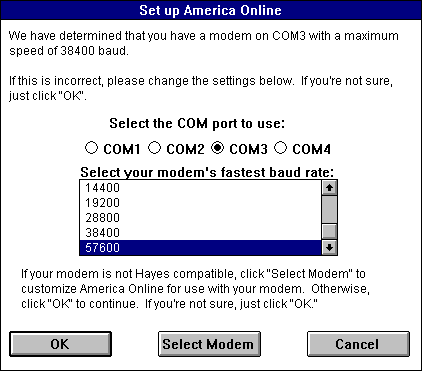
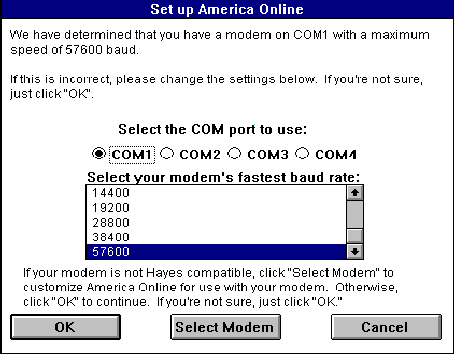
Start Windows and run SETUP.EXE from your America Online CD or floppy disk. Allow the program to search your system's hardware and software. Next, click Install, or choose Review, if you want to make changes to the default directory settings. After a few minutes, the program will finish installing the files. Click OK to continue. To start America Online 3.0, click the America Online 3.0 icon under the America Online program group. When the program is done updating the software, click NO. Enter an access number closest to your area and continue. Next, select your COM Port and baud rate as shown below (Note: Your settings may be different):
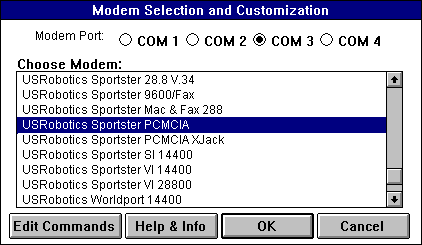
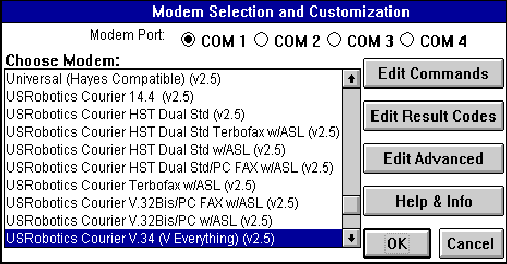
After everything is configured, click Select Modem. If none of the listed modems are the exact model you own, then choose a USRobotics modem that matches the same speed as your unit and click OK:
If the software finds any discrepancies in the modem's settings, it will inform you and give you the opportunity to change them. Change settings as needed, if this happens. Click OK and then Continue. The software will now call an 800 number and find your local access number. After you have the numbers, the software will hang-up and call the selected access number and sign on.
To make changes after the initial installation, start America Online, but do not connect. Click SETUP. Next, select the profile/location you want to change and click Edit Location.
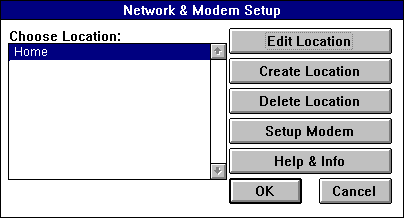
| CHANGE PORT: | Click Setup Modem and select Modem Port from the button bar. Click OK to save the changes. |
| CHANGE IRQ: | This is found in the Windows' Control Panel. |
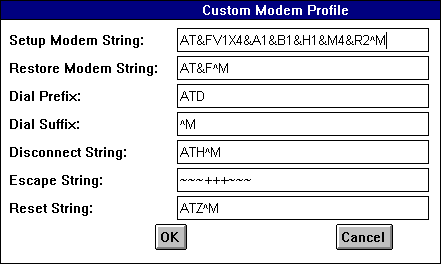
| INIT STRING: | Click Setup Modem and then Edit Commands. The software will save your current settings in a profile called Custom Modem Profile. The default should work fine. This is the profile we used. |
TERMINAL MODE: None.
| Note: | If you find that the modem stops responding after changes are made to the settings, and you know they are accurate, try exiting the program and going back into it. |
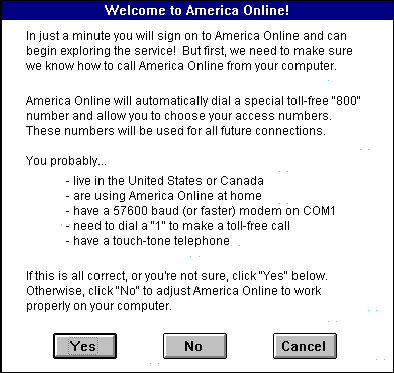
When the program first starts, select No to the first prompt. (See screen below).
The software should now dial into America Online and give you your local access numbers. The software then re-dials and connects to the system. You are now connected and ready to start using America Online.
America Online software does not work well with FAXstf. It turns out to be a port issue between the two programs. Below is a workaround for this issue:
After you start the program, click Setup. If you have more than one dial-up locate defined, choose the one you want to modify. Click Setup Modem.
CHANGE PORT: The port can be changed in the Setup Modem dialog box.In addition to the above changes, you will have to choose a modem type from the modem list in the Setup Modem dialog box. There is an option for a "Courier HST/Sportster 9600". Do not select it. You should choose the "Hayes compatible (error correcting)" modem option.