6200 Lake Ming Road
Bakersfield, CA 93306
(661) 873-2500 - Main Number
(800) 999-9619 - Sales & Orders
(661) 873-2550 - Tech Support
(661) 873-2599 - Fax Number
(661) 873-2400 - BBS
GO MUSTANG - CompuServe
keyword MUSTANG - AOL
keyword MUSTANG - Microsoft Network
online.mustang.com - Telnet BBS
business@mustang.com - Customer Service
support@mustang.com - Technical Support
QmodemPro for Windows 95 version 2.0:
DIP Switches: 3, 5, and 8 DOWN (ON)
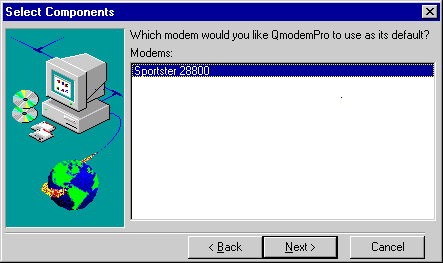
Run SETUP.EXE. You will then be asked what type of install you want to perform. We suggest selecting 'Typical'. Next the select components box will come up, showing you a list of your previously installed modems.
Highlight the modem you want to use with QmodemPro and click Next.
| CHANGE PORT: | Select Connections, then Properties. These can only be changed when you are in Direct Connection mode under Connections. |
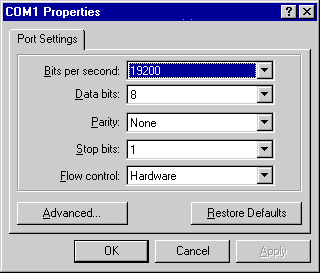
| CHANGE IRQ: | Follow the Port rate setting above. Set 19200 for our 14.4k modems and 38400 or higher for our 21.6k or faster modems. |
| INIT STRING: | Can be changed by making different push button changes in the individual phone directories. The default settings seemed to work fine. If you are having problems connecting while in Direct Connection mode, try typing AT&F1 and see if that helps. |
| TERMINAL MODE: | Select Connections and click on Direct Connection. Then select your COM Port, Baud Rate(19,200 for 14.4k Modem and 38,400 or higher for 21.6k or faster modems), etc. The only other way to dial is through the dialing directory. |