Worldgroup Manager v1.01 for Windows:
DIP Switches: 3, 5, and 8 DOWN (ON)
To install Worldgroup Manager, run SETUP.EXE from within Windows. Once installed, click on the WorldGroup Manager icon. The Worldgroup Manager will come up, as well as any BBSs that are already installed.
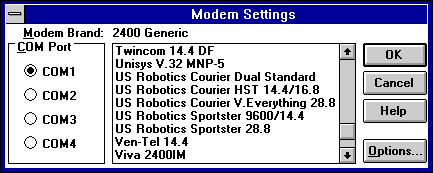
| CHANGE PORT: | Click on Options and then Modem Settings. Set the COM Port to match the COM Port your modem is on, as shown in the picture below. |
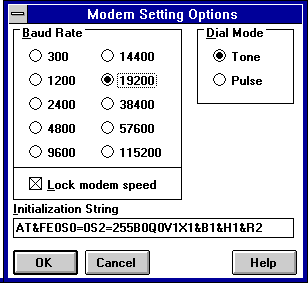
| INIT STRING: | Select your modem type by clicking on Options and then Modem Settings. Pick the modem closest to your model. The software places X1 in the init string, so this needs to be changed to X4 or X7 to allow for complete line detection when dialing. To do this, highlight the modem closest to yours and click on Options. The below screen will come up. Change the X1 below to the appropriate setting as mentioned above. |
| Terminal Mode: | This program uses icon groups to dial out. To add new dial icons, click on File/New, then set your dialing properties from there. |
| Note: | If you do not make the changes described above to the init string, the modem will not hang-up or redial on busy. It will also not be able to detect dialtones in case the line is off the hook or there is an incoming call. |